
A SecurityScorecard rating is an outside-in security grade assigned to your organization based entirely on what’s publicly visible from the internet. It doesn’t require your cooperation, your credentials, or even your awareness. SecurityScorecard scans your public-facing infrastructure and scores what it finds — the same way an attacker would look at your site before deciding whether to probe further.
If you’ve received a scorecard from a client, a vendor, or your own security team and aren’t sure what it means, this article explains what the platform measures, why certain issues are difficult to fix on shared or managed hosting, and what changes with a dedicated server.
How Does SecurityScorecard Measure Your Security?
SecurityScorecard scans the entire IPv4 address space — more than 3.9 billion routable IP addresses — every 10 days across more than 1,400 ports. The platform also scans cloud assets multiple times daily because cloud IP ownership changes frequently.
The scan collects everything an attacker would observe from the outside: exposed ports, outdated software versions, and known vulnerabilities, along with data from private sources such as threat intelligence feeds and vulnerability databases.
Nothing about this process requires access to your systems. Your score reflects what SecurityScorecard can see from the public internet — which is also what anyone trying to compromise your site would see first.
Scores update daily. If your infrastructure and issue counts remain stable, your score holds steady. If you remediate a finding, your score improves, often within 24 to 48 hours after the next scan cycle confirms the fix.
What Does the Letter Grade Actually Mean?
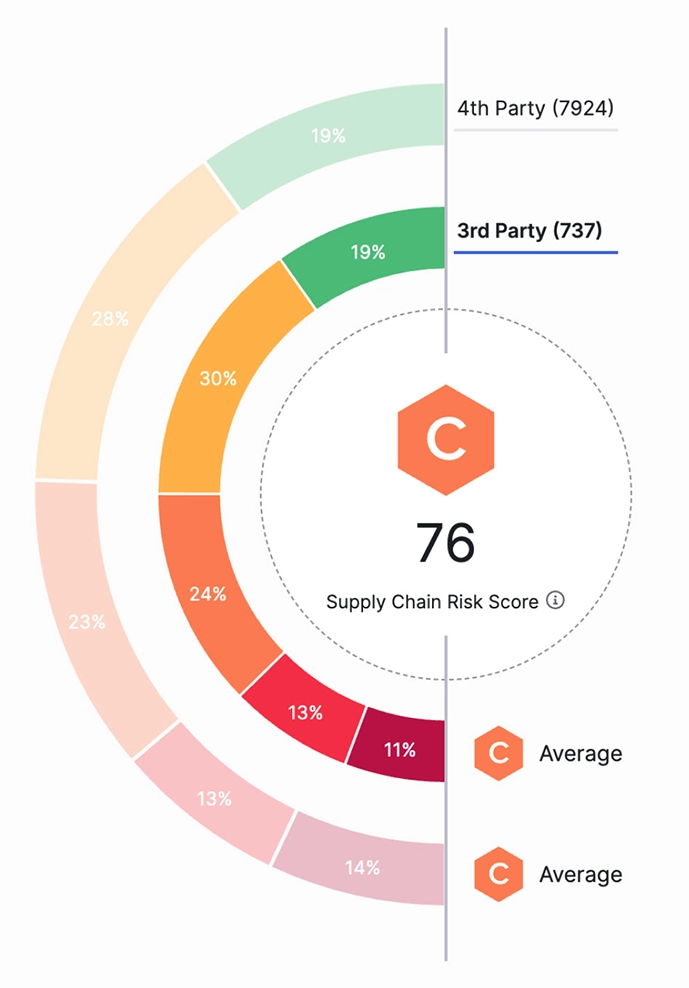
The letter grade — A through F — and the corresponding numeric score from 100 to 0 reflect the statistical likelihood that your organization will experience a breach. The lower the score, the higher the likelihood.
The relationship between grade and breach probability is significant:
A (90–100): Lowest breach likelihood
B (80–89): Low risk
C (70–79): Moderate risk
D (60–69): Elevated risk
F (below 60): High risk
Organizations with an F grade are 13.8 times more likely to experience a breach than those with an A. That’s not a marginal difference. A D-rated organization sits one grade above that threshold, and a scheduled scoring recalibration can move the needle further in either direction.
What Are the 10 Risk Factors SecurityScorecard Evaluates?
SecurityScorecard rates companies across 10 risk factors: application security, cubit score, DNS health, endpoint security, hacker chatter, leaked credentials, IP reputation, network security, patching cadence, and social engineering.
Several of these are directly connected to how your server is configured:
Network Security checks for insecure open ports, weak TLS protocols, and misconfigured cipher suites. Insecure ports can be exploited to allow an attacker to circumvent the login process or gain elevated access to a system. If misconfigured, an open port acts as a direct entry point between a hacker’s environment and your internal network.
Application Security evaluates whether your web properties implement HTTP security headers — controls like Content Security Policy (CSP), HTTP Strict Transport Security (HSTS), and X-Content-Type-Options that browsers use to block common attack vectors.
Patching Cadence measures how quickly your organization responds to known vulnerabilities and applies patches, compared to peers of similar size. Slow patching is one of the most consistently penalized behaviors on the platform.
DNS Health validates that DNS configuration is clean, that mail servers have proper spoofing protections (SPF, DKIM, DMARC), and that no malicious events appear in your passive DNS history.
The remaining factors — IP reputation, endpoint security, hacker chatter, leaked credentials — reflect things like whether your IPs have appeared in malware feeds, whether credentials from your organization have shown up in breach data, and whether your organization is discussed in threat actor communities.
Why Do Enterprise Clients and Procurement Teams Care About Your Score?
A SecurityScorecard rating has moved well beyond internal security use. The platform’s patented technology is used by organizations for enterprise risk management, third-party risk management, board reporting, due diligence, cyber insurance underwriting, and regulatory oversight.
That means your score is increasingly visible to parties outside your organization:
Enterprise clients running vendor risk programs check supplier scorecards before signing contracts. Some set minimum score thresholds that vendors must meet to be approved.
Cyber insurers use SecurityScorecard ratings when pricing policies. The platform has already delivered industry-first cyber insurance discounts tied directly to top security ratings through insurer partnerships. A low score can increase your premium or limit your coverage options.
Procurement teams at regulated companies — finance, healthcare, government contractors — are often required to document the security posture of every vendor before approving them. An F or D scorecard is a documented red flag in that process.
That surprises a lot of website owners. Most assume a security rating is an internal compliance metric. For agencies and businesses that sell to enterprise clients, it functions more like a credit score — visible to counterparties and capable of affecting deals before a conversation ever starts.
Which Issues on Your Scorecard Are Hosting Configuration Problems?
Many of the findings that appear on a SecurityScorecard report are not software bugs or credential leaks. They’re server configuration issues — things that exist or don’t exist based on decisions made at the infrastructure level.
Consider what appears most frequently on low-scoring sites:
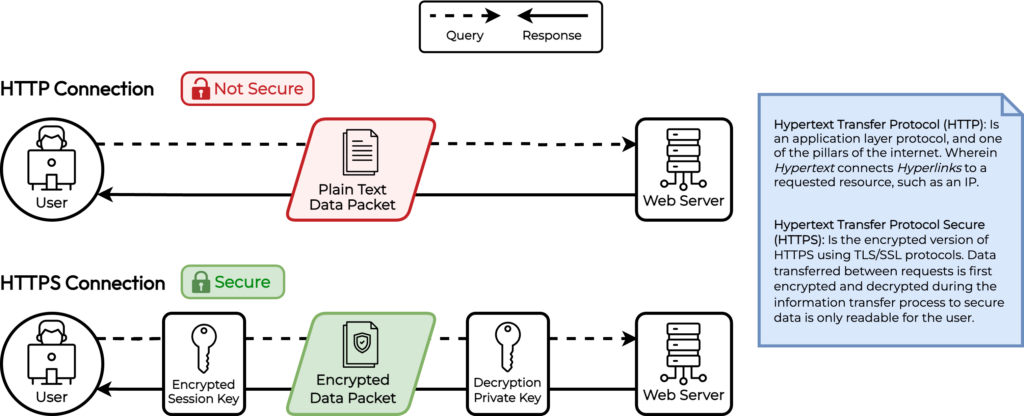
TLS Protocol Support: A server that still accepts connections over TLS 1.0 or TLS 1.1 is flagged as a high-severity network security issue. These protocols were deprecated by the IETF in 2021 because of known cryptographic weaknesses. Whether those protocols are enabled or disabled is controlled in your web server configuration — Apache, NGINX, and Linux OS — not in your application code.
Cipher Suite Selection: Weak cipher suites — those using RC4, 3DES, or export-grade encryption — are separately flagged. Which cipher suites your server advertises is set in the same web server config files. An application running on WordPress or Magento has no control over this; the server controls it.
HTTP Security Headers: CSP, HSTS, X-Content-Type-Options, X-Frame-Options — these are headers that servers send to browsers to restrict what the browser is allowed to do with content from your domain. Adding them requires either a directive in your web server configuration or middleware at the server level. They cannot be reliably set from inside WordPress or a CMS plugin alone, and a CDN may override or strip headers depending on its configuration.
Certificate Configuration: Certificate lifetime, revocation support, and signature algorithm are properties of how a TLS certificate is issued and configured on the server. These are not issues inside your application; they’re issues with how the certificate is deployed.
Why Shared and Restrictive Hosting Environments Limit What You Can Fix
This is where hosting choice becomes a security question, not just a performance or price question.
On shared hosting — including restrictive managed WordPress platforms — the server is configured and maintained by the hosting provider. That’s the tradeoff: you don’t have to manage the server, but you also can’t configure it. The web server that serves your site is shared with dozens or hundreds of other customers, and its configuration reflects the provider’s choices, not yours.
If your hosting provider hasn’t disabled TLS 1.0 across the platform, your site will continue advertising TLS 1.0 support. If HSTS isn’t configured at the server level, your site won’t send HSTS headers even if you want it to. And because that configuration serves thousands of sites, providers are slow to change it — any misconfiguration affects every customer.
Managed WordPress hosts specifically optimize for WordPress performance and uptime. Server-level security hardening is typically not part of what they sell. When you ask them to modify cipher suites or add global security headers, the answer is often either “we can’t do that” or “submit a support ticket and we’ll review it” — with no timeline and no guarantee.
This creates a predictable situation: findings appear on your SecurityScorecard report, you look into fixing them, and you discover the fix requires server access you don’t have.
What Changes with a Dedicated Server
A dedicated server gives you root access to a physical machine that no one else shares. Every configuration decision — which TLS versions the server accepts, which cipher suites it advertises, which HTTP headers it sends, how certificates are managed — is yours to make.
That means every issue in the Network Security and Application Security categories of a SecurityScorecard report becomes actionable. Disabling TLS 1.0 and 1.1 on an Apache server takes a single configuration change and a service reload. Adding HSTS to every response is three lines in a server block. Enforcing a strict Content Security Policy requires access to the same configuration file. None of these require a support ticket. None require waiting for a provider to act.
On InMotion Hosting’s Dedicated Servers, you have full root access and full cPanel/WHM control. For customers who prefer a guided approach, InMotion Solutions — the in-house sysadmin team — can implement server-level hardening, handle TLS configuration, and validate changes against security scoring criteria. The Premier Care Bundle adds proactive security management with Monarx malware defense and Advanced Product Support.
The practical outcome: configuration-related SecurityScorecard findings that are unfixable on shared hosting become achievable on a dedicated server.
What SecurityScorecard Does Not Measure
A few clarifications worth making, because the platform is sometimes overstated in what it covers.
SecurityScorecard measures your external attack surface — what’s visible from the public internet. It does not evaluate your internal network security, your access controls, your employee training, or your incident response procedures. A perfect SecurityScorecard score does not mean your organization has no security vulnerabilities; it means your publicly-facing infrastructure doesn’t exhibit the signals the platform checks.
The platform also has known limitations around IP attribution. IP attribution issues are cited as common scanning problems, and some users report misflagged IPs requiring support intervention. If findings appear that don’t match your infrastructure, SecurityScorecard provides a dispute process for reviewing and contesting misattributions.
Scores also reflect your peer environment. SecurityScorecard applies a logarithmic scale and calibrates scores against more than 12 million organizations, comparing your issue volume to others of similar size and digital footprint. A small business and an enterprise don’t compete on raw finding counts.
How to Start Improving Your Score
If you’re looking at a scorecard with multiple open issues, the most practical path is to work from highest to lowest breach risk — which is exactly how the issues tab in the platform sorts them.
For most small-to-midsize sites, the highest-impact improvements fall into three categories:
TLS and cipher suite configuration — Disable TLS 1.0 and 1.1; remove weak cipher suites. These are typically the highest-breach-risk network security findings.
HTTP security headers — Add HSTS, CSP, X-Content-Type-Options, and X-Frame-Options at the server level. These address the bulk of application security findings.
Certificate management — Ensure certificates use current signature algorithms (ECDSA or RSA-SHA256 minimum), implement OCSP stapling for revocation support, and target certificate lifetimes that align with current best practices.
All three require server-level access. If your current hosting environment doesn’t provide that access, fixing your score means either working within the constraints of what your provider supports, or moving to an environment where those decisions are yours to make.
How to Take Control of Your Security Configuration
A SecurityScorecard rating reflects real infrastructure decisions, and infrastructure decisions start with where your site lives. If your scorecard shows persistent configuration findings that your current hosting provider can’t address, InMotion Hosting’s Dedicated Servers give you the root access, managed support, and security expertise to fix them — and keep them fixed.