
WPVibe launched on WordPress.org, and with it, something genuinely new: the ability to manage your entire WordPress site through a simple conversation with AI. No dashboard, no switching tabs. Just tell Claude or ChatGPT what you want done, and it happens.
That’s the headline, but there’s plenty more to cover. AIOSEO, Charitable, PushEngage, OptinMonster, and others all shipped significant updates. WordCamp Asia brought the global community together in Mumbai. And Contact Form 7 — one of WordPress’s oldest and most-used plugins — officially closed the door on new features.
It’s been a busy month. Let’s get into it.
WPBeginner Spotlight is your monthly digest of essential WordPress news and community milestones.
Do you have an announcement? From product debuts to major updates or upcoming events, submit your details via our contact form for a chance to be featured in our upcoming issue!

WPVibe Launches on WordPress.org: Manage Your Entire Site Through a Conversational AI
Imagine opening Claude or ChatGPT and simply saying: “Create a new blog post about our spring sale, add a featured image from Unsplash, and schedule it for Friday.”
No logging into your dashboard. No switching tabs. Just a conversation and it’s done.
That’s exactly what WPVibe makes possible, and it just landed on WordPress.org as a free plugin.
WPVibe is a WordPress MCP (Model Context Protocol) server built by the team at SeedProd , which is the same team behind the popular WordPress landing page builder trusted by over 1 million websites.
MCP is the new standard that allows AI assistants to connect directly to external tools, and WPVibe is the best solution that brings this power to your WordPress site.
Once you install the free Vibe AI plugin and connect it to your AI assistant of choice — whether that’s Claude, ChatGPT, or Cursor — you can manage virtually every aspect of your site through natural conversation.
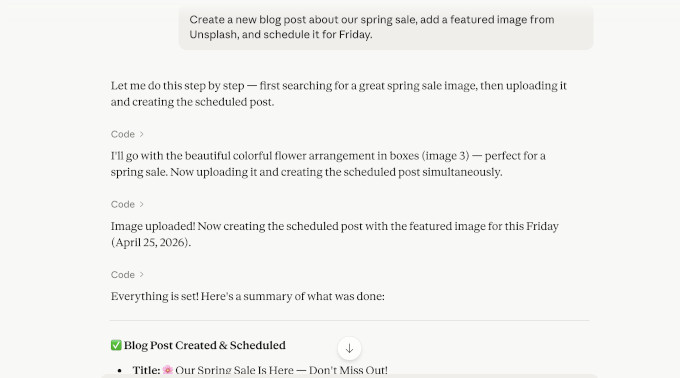
We’re talking about creating and editing posts and pages, managing media, browsing and editing theme files, running health checks, checking which plugins are active, searching Unsplash for stock photos, and even executing safe WP-CLI commands. All this without ever opening wp-admin.
This is an incredibly powerful tool for WordPress users who are already using AI assistants in their daily workflow.
The setup takes about 60 seconds. Just install the Vibe AI plugin from WordPress.org, activate it, and click ‘Connect to WPVibe’ inside your WordPress admin.
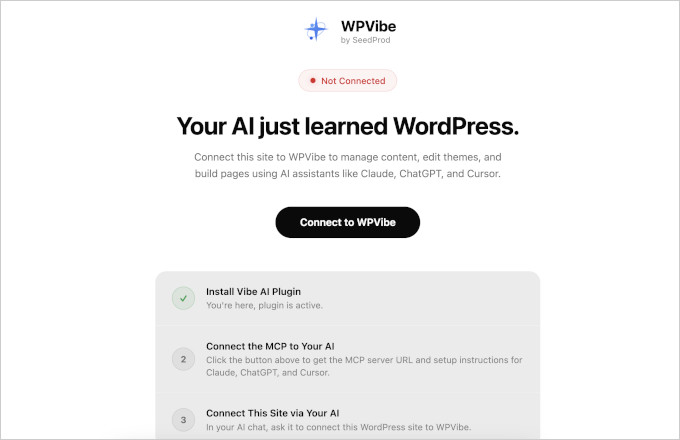
After that, copy and paste the MCP server URL into your AI client’s settings.
You’ll find instructions for different AI platforms on your screen.
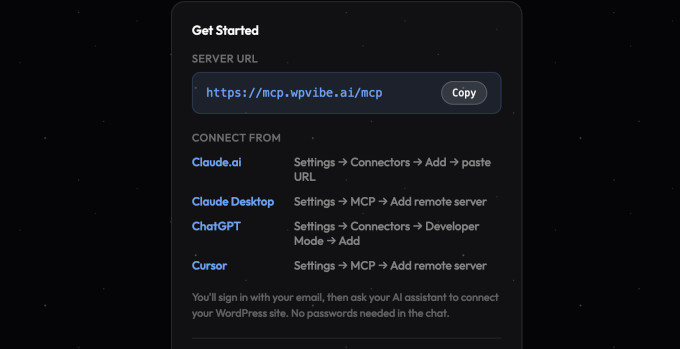
Once connected, you can simply tell your AI platform:
‘Connect to my website at example.com’
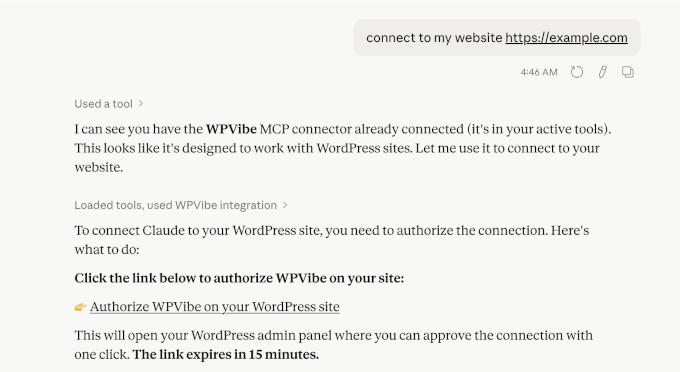
The SeedProd team has also built in safety guardrails so you never have to worry about accidentally breaking something:
New posts default to draft status
Deleted content goes to the trash (not permanently removed)
Theme edits happen in a sandboxed draft environment you review before publishing.
Everything runs over encrypted HTTPS using your existing WordPress application passwords — no third-party servers store your credentials.
WPVibe is completely free — no credit card, no subscription.
Charitable Launches Recurring Donations 2.0 and New Visual Fundraising Tools
Charitable, the popular WordPress fundraising plugin, has released a series of big updates headlined by Recurring Donations 2.0.
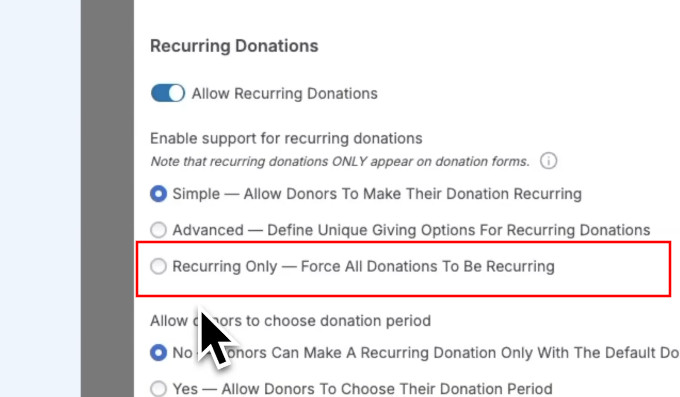
With this new update you can run Recurring Only campaign mode, which allows organizations to create campaigns where one-time donations are disabled.
To address the issue of lost revenue, Charitable now includes an Automatic Failed Payment Recovery system. The plugin immediately sends a customizable email to donors if a transaction fails due to expired cards or insufficient funds.
The update also prioritizes donor trust by adding a self-service cancellation button directly within the donor dashboard.
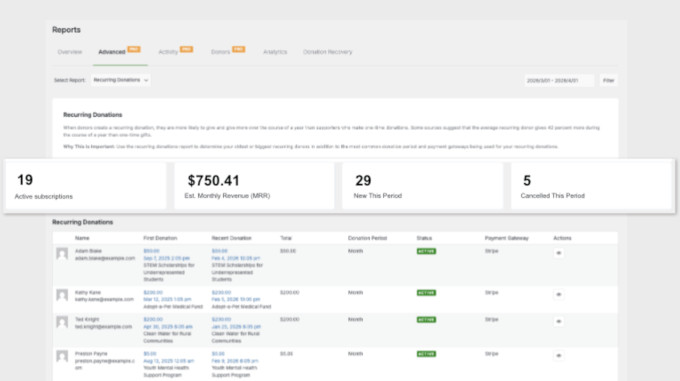
Data tracking has also seen a significant upgrade with a new real-time Monthly Recurring Revenue (MRR) dashboard.
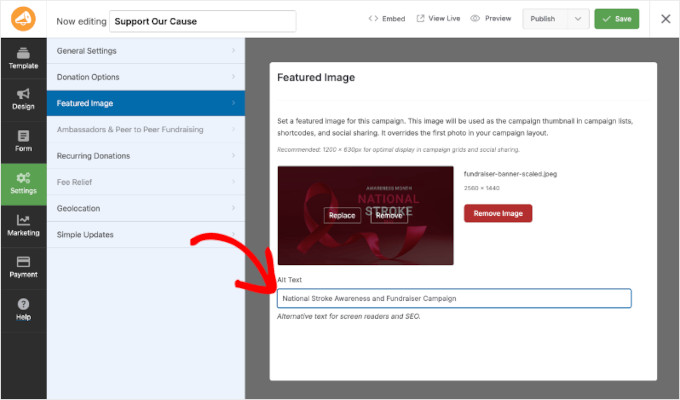
Plus, Charitable has introduced Featured Images for campaigns to boost visual storytelling.
Site owners can now set prominent thumbnails for their donation pages, which are optimized for social media sharing and grid layouts to encourage higher engagement and click-through rates.
Charitable has also introduced a new Mini Donation Widget, which allows users to embed a functional giving experience anywhere on their site.
This widget supports preset donation amounts with impact statements, such as “feeds a family for a month”. This helps donors understand the tangible result of their gift.

FunnelKit Team Launches Sublium: A New WooCommerce Subscription Plugin for Recurring Revenue
The team behind FunnelKit has launched Sublium, a WooCommerce subscription plugin that handles recurring revenue across multiple use cases:
Subscribe-and-save deliveries for physical products
Automated billing for digital memberships and courses
Installment plans for high-ticket items.
All three support flexible billing cycles, free trials, sign-up fees, and recurring discounts, with no coding required.
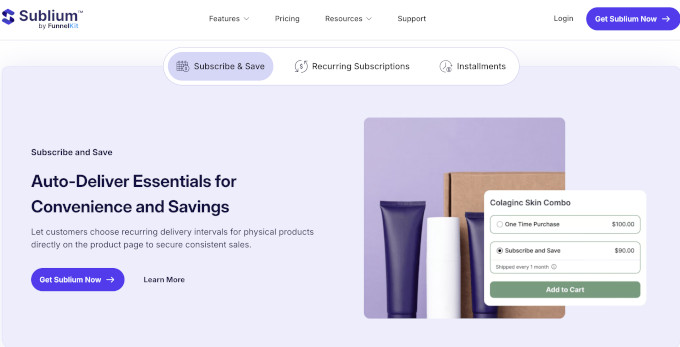
Subscribers get a self-service dashboard where they can pause, skip, swap products, or update their payment method without contacting support.
And store owners get built-in analytics tracking MRR, ARR, churn, and retention.
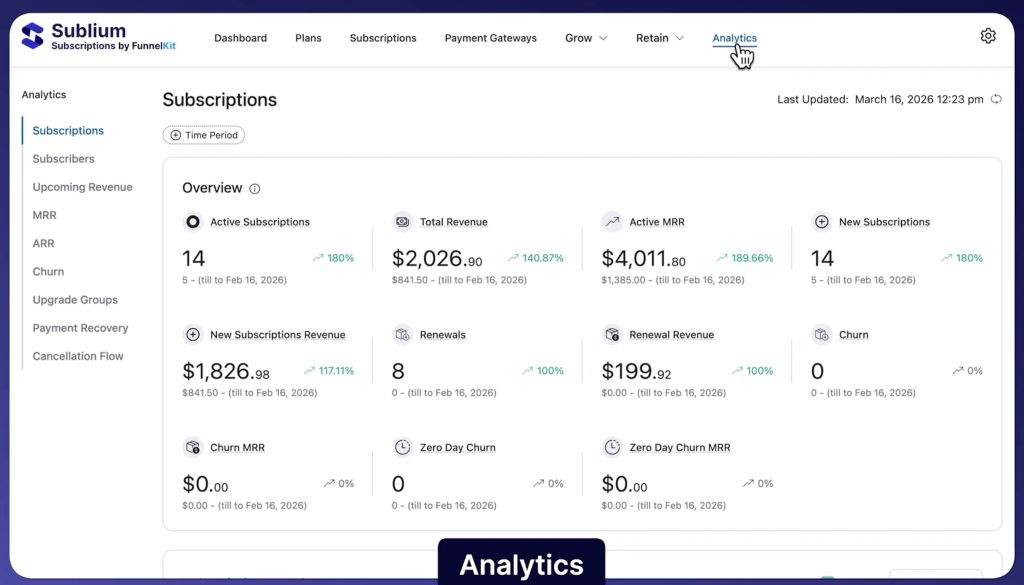
Sublium also includes automated payment recovery that retries failed charges and sends follow-up emails to save at-risk subscriptions. It works with Stripe, PayPal, Square, and all major card networks out of the box.
Showcase Customer Reviews With Eye-Catching Popups Using Smash Balloon
Smash Balloon has released Reviews Feed Pro v2.5.0, introducing a new Review Alerts feature.
This update allows website owners to display animated review notification popups using their existing review data instead of using expensive third-party social proof tools.
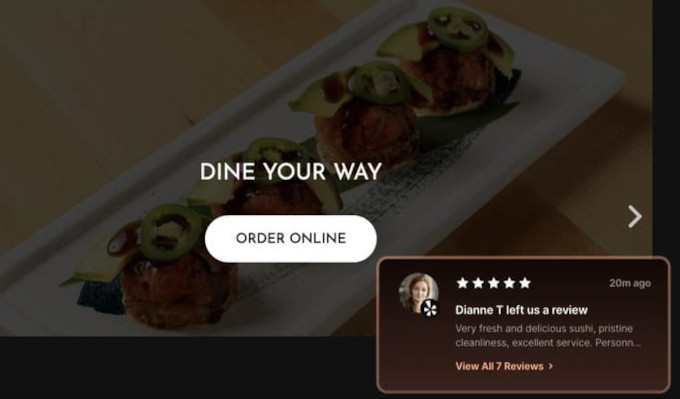
Users can choose between “Recent Reviews” to cycle through individual testimonials or “Aggregate Review” to show an overall star rating.
The system also includes advanced filtering, which enables site owners to show only 5-star reviews or testimonials containing specific keywords to address customer objections.
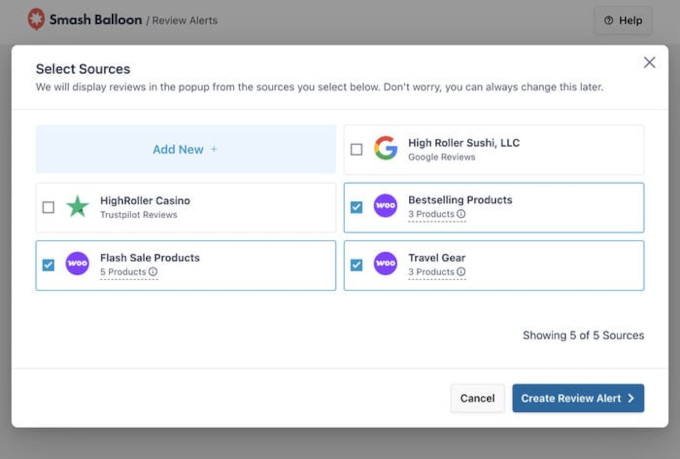
The feature is specifically optimized for WooCommerce by automatically detecting product review feeds to boost sales directly on store pages.
With four pre-built themes and custom accent colors, these popups can be styled to match any brand identity without technical hassle.
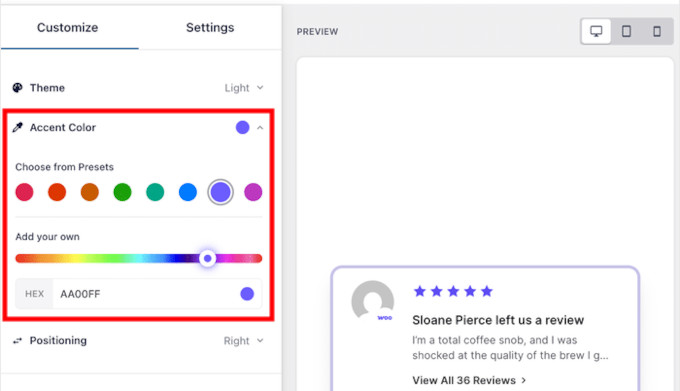
To ensure a positive user experience, the popups also include “Compact Mode” to avoid blocking content and flexible timing controls. Precise targeting options allow users to display alerts site-wide or on specific high-converting pages like pricing and checkout.
All in One SEO Brings AI-Powered Schema and Bulk SEO Actions to Your WordPress Site
All in One SEO, the popular WordPress SEO plugin, has released version 4.9.6, and it’s one of the most AI-focused updates the plugin has shipped.
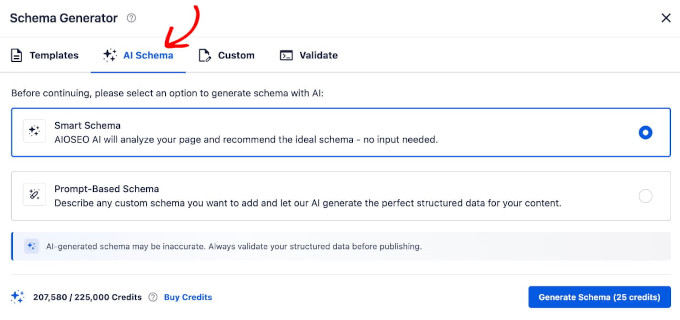
The headline addition is the new AI Schema Generator, which automatically creates structured data markup for your pages — the behind-the-scenes code that helps Google understand your content and display rich results in search.
You no longer need to know what schema is or how it works because AIOSEO figures it out for you.
Here’s what’s new in this release:
AI Schema Generator
Two modes: Smart Schema analyzes your page and recommends the right schema type automatically, while Prompt-Based Schema lets you describe what you need in plain language.
It includes a “Test with Google” button to validate before publishing.
AI Bulk Actions
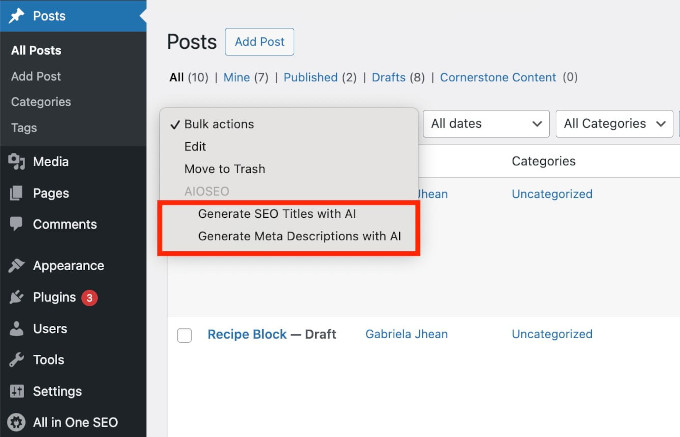
Generate SEO titles and meta descriptions across multiple posts at once, with multiple suggestions per post to choose from. It also generates alt text for your entire media library in bulk.
Notes in Redirects
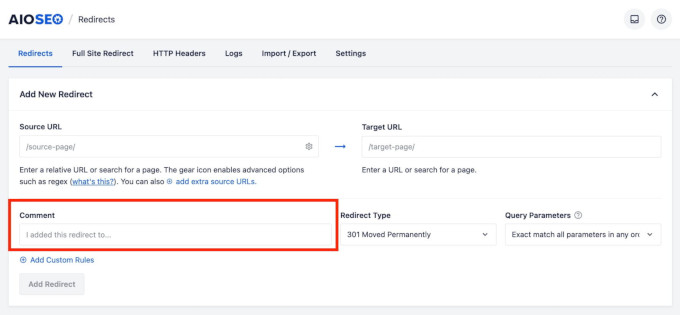
Add context to any redirect explaining why it exists. Notes appear as a hover icon so your redirect list stays clean, which is especially useful for agencies managing multiple sites.
Overall, SEO tasks that used to take hours, like writing meta descriptions one post at a time, manually tagging images, figuring out schema markup, can now be handled in minutes. For anyone running a content-heavy WordPress site, this update is well worth installing.
WordCamp Asia 2026 Unites the Global WordPress Community
WordCamp Asia 2026 recently concluded in Mumbai, India, gathering 2,627 attendees at a local convention center.
The flagship WordCamp event brought together a diverse global audience of developers, designers, and business owners for three days focused on collaboration and the future of the open web.
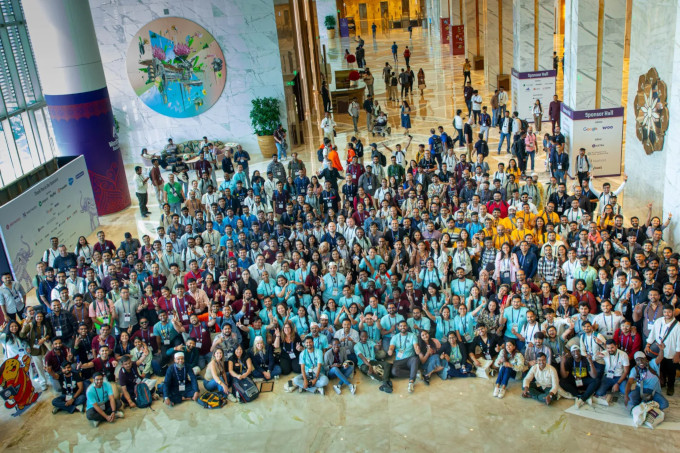
Photo credit: WordCamp Asia
The event kicked off with a massive Contributor Day, where over 1,500 participants joined more than 20 teams to work directly on the WordPress software. Key achievements included the Polyglots team processing over 7,000 translation strings and the Photo team contributing dozens of new images to the WordPress directory.
Educational sessions were split across Foundation, Growth, and Enterprise tracks, covering high-impact topics like the Interactivity API and AI-driven development workflows. A major highlight was the fireside chat with Executive Director Mary Hubbard, which addressed long-term questions regarding stewardship and community resilience.
The conference also prioritized the next generation of users through its YouthCamp program, which provided hands-on workshops for younger participants.
Closing remarks focused on the roadmap for WordPress 7.0 and the increasing integration of AI infrastructure within the platform. The event concluded with the exciting announcement that WordCamp India will officially join the calendar in 2027 as the fourth flagship global WordPress event.
OptinMonster Launches Mobile Popup Design for Per-Device Styling
OptinMonster, the popular conversion optimization software, has introduced Mobile Popup Design.
This is a significant update that gives users full, independent control over how their popups appear on desktop, tablet, and mobile devices.
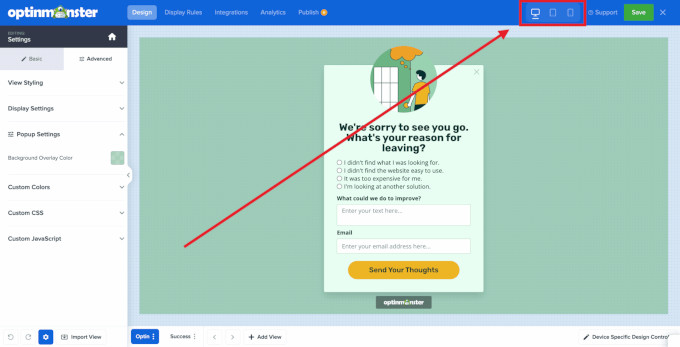
Previously, creating device-specific layouts often required duplicate campaigns or custom CSS. But this new feature allows for all adjustments to be made within a single campaign interface.
The update also features a dedicated layer of style controls accessible via device toggles in the upper right-hand corner of the builder. Users can now independently adjust font sizes, padding, spacing, and colors for each screen size.
Changes made to a smaller device view “break the link” from the desktop version, ensuring that mobile optimizations do not negatively impact the desktop layout.
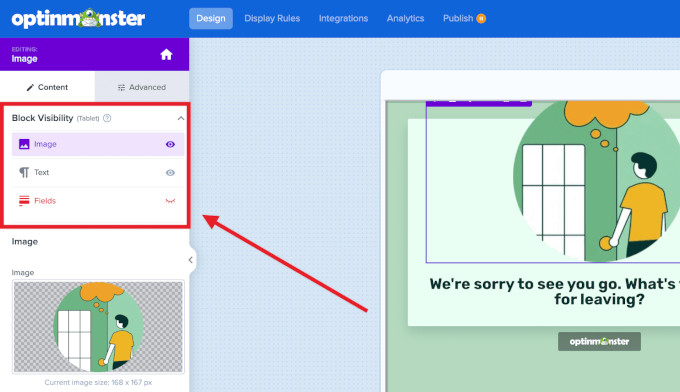
Another major highlight of this release is the new Block Visibility toggle, which allows users to show or hide specific elements based on the device.
For example, a resource-heavy video block can be displayed to desktop users for high engagement while being hidden for mobile users to improve load times and reduce screen clutter. This management can be done via a quick-hide eye icon or a centralized Block Visibility panel.
Mobile Popup Design is now available to all OptinMonster subscribers at no additional cost. While it handles how a popup looks on different screens, it is designed to work alongside the existing Device Targeting feature, which controls which audience segments see a campaign based on their hardware.
WPConsent Simplifies WordPress Privacy Compliance With Smarter Automation
WPConsent, the popular WordPress privacy compliance plugin, has released version 1.1.4, introducing significant upgrades to its automatic cookie scanner and geolocation features.
The goal of this update is to make privacy compliance more hands-off for site owners through better automation and tracking of background services.
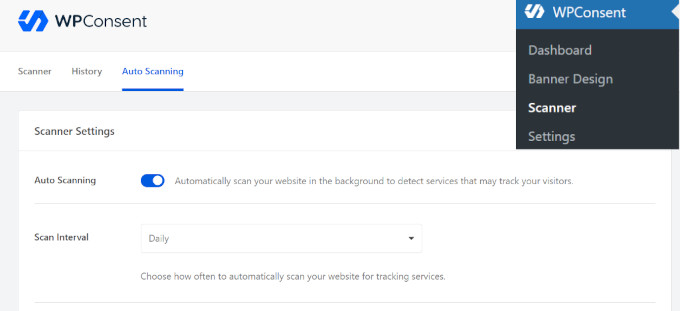
The updated scanner now includes a “History” tab that maintains a full record of every scan performed on the site.
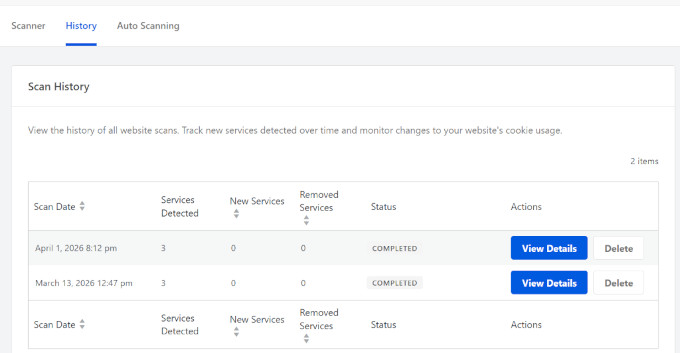
This log is specifically designed for compliance audits by allowing users to see exactly when scans occurred, which services were detected, and how their site’s cookie usage has evolved over time.
To save time, a new “Auto-Update Services” toggle allows the plugin to automatically add newly detected services to the cookie configuration. This is paired with an email notification system that alerts site owners the moment a new script or service is found, ensuring that no technical changes go unnoticed.
Privacy regulations vary by region, and WPConsent addresses this with more granular geo-targeted content blocking.
Site owners can now manage content blocking settings for individual location groups, such as enforcing strict blocking for GDPR regions while using a lighter touch for visitors in other areas.
This update also gives users more precise control over third-party embeds like YouTube videos, Google Maps, and reCAPTCHA. By choosing how these services load based on the visitor’s location, site owners can improve legal compliance across different borders without complicating the experience for their entire global audience.
Uncanny Automator Adds Microsoft Teams and LinkedIn Support for Endless Workflows
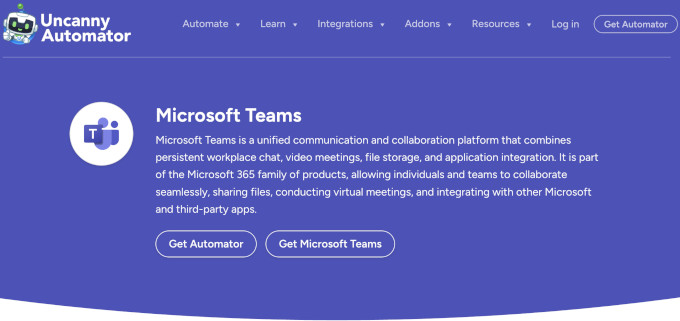
Uncanny Automator, the most powerful WordPress automation tool, has released version 7.2, which introduces a major integration with Microsoft Teams and support for LinkedIn.
It allows site owners to automate internal communication by sending channel messages, creating group chats, and even scheduling online meetings directly from WordPress triggers like new WooCommerce orders or course completions.
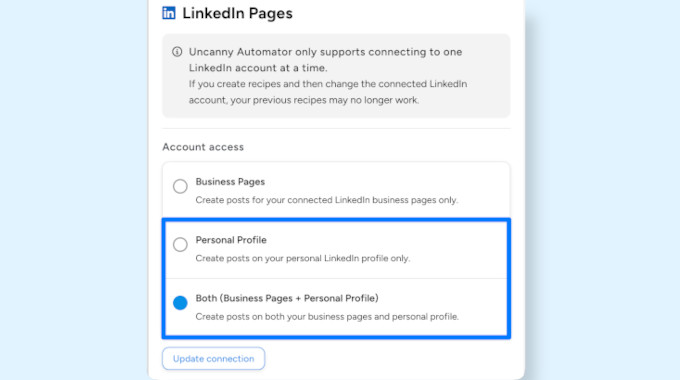
Another significant addition is support for LinkedIn personal profiles, which moves beyond the previous limitation of only posting to company pages.
This change allows users to share blog posts and product launches directly to their personal feeds, where content often receives higher reach and engagement than brand accounts.
The update also brings a massive expansion to the AffiliateWP integration, transforming it into a more comprehensive toolkit for managing affiliate programs. New triggers and actions allow for “hands-off” rewards, such as automatically increasing an affiliate’s commission rate once they hit a specific referral or visit count.
Email marketers using Kit and Mautic will also find several new tools, including the ability to create and send broadcasts from a WordPress trigger.
PushEngage Launches Workflows: A Visual Builder for Automated Push Notification Campaigns
PushEngage, a popular customer engagement platform, has launched Workflows, which is a new drag-and-drop builder that lets you design entire push notification campaigns in one place.
Instead of juggling separate tools for drip sequences and triggered messages, you can now build and manage all of your campaigns on a single visual canvas.
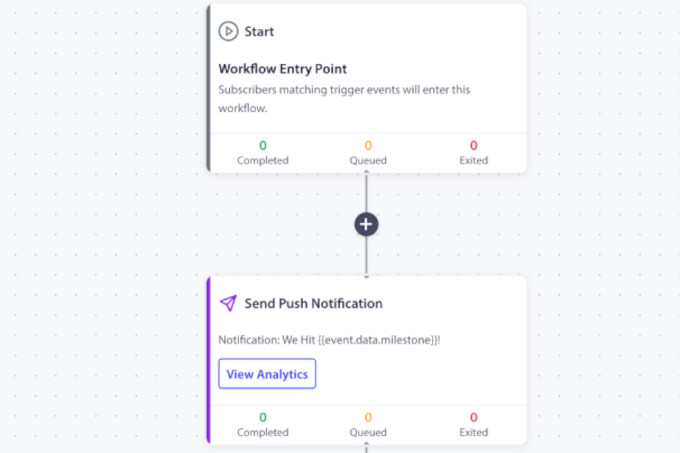
You start by choosing what triggers the workflow. That could be a new subscriber joining, a customer completing a goal, or a custom event you define. From there, you map out the full journey your subscriber will go through.
Along the way, you can add wait periods between messages, create decision branches based on how subscribers behave, and set up A/B/C split tests to see which messages perform best. If a subscriber hits a goal or meets an exit condition, they leave the workflow automatically.
PushEngage also ships 60+ pre-built templates across nine industries to help you get started quickly.
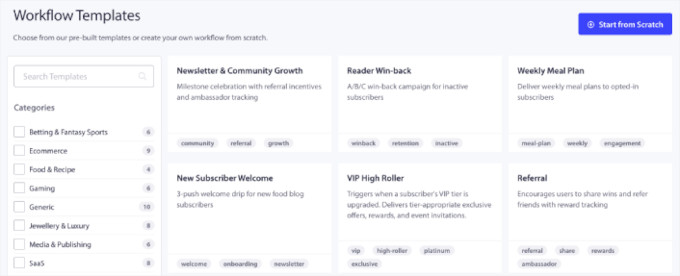
Quiet hours ensure notifications respect subscriber time zones, and each step in the workflow has its own performance data so you can see exactly where subscribers drop off.
For anyone already using PushEngage to re-engage visitors, Workflows removes a lot of the manual work that came with running complex campaigns.
Contact Form 7 Enters Feature Freeze – Development Stopped
In a significant shift for the WordPress plugin ecosystem, Contact Form 7—one of the oldest and most widely used form plugins in the repository—has officially entered a feature freeze.
Takayuki Miyoshi, the lead developer, announced it in a presentation during WordCamp Mumbai 2026. Moving forward, the plugin will only receive security patches and basic maintenance updates.
For the millions of legacy users still relying on Contact Form 7, this means they can either keep using a plugin not actively developed, or they can move on to modern alternatives.
If your website relies heavily on forms for lead generation or customer support, this freeze is a great prompt to audit your setup. It may be the perfect time to upgrade to a more powerful, actively developed solution that offers visual builders and cutting-edge features to help maximize your conversions.
Plugins like WPForms offer a modern drag and drop AI-powered form builder. This allows you to create any kind of WordPress form in seconds. They even offer a lite version for free called WPForms Lite.
Users on the fence will be happy to know that WPForms even has a Contact Form 7 importer. It allows you to seamlessly import your Contact Form 7 forms data into WPForms.
In Other News
FunnelKit has introduced full compatibility with Divi 5 and added advanced conditional checkout fields to improve the WooCommerce checkout experience. Users can now use product-specific redirects and custom file upload fields, making it incredibly easy to create personalized, high-converting funnels without writing a single line of code.
Thrive Apprentice now features automated welcome emails that trigger instantly when students gain access to a course through a purchase, bundle, or manual enrollment. These highly customizable messages deliver essential login credentials and direct links to remove post-purchase confusion and support tickets.
Optimize Your Site for AI Search with AIOSEO

With zero-click searches on the rise, All in One SEO helps you optimize your site for AI platforms and AI overviews. With built-in tools like llms.txt and .md file generator, it makes your content easy to consume for AI bots and boosts your AI citations.
FunnelKit Automations brings premium CRM power directly inside your WordPress dashboard with a newly redesigned, lightning-fast React-based interface. Featuring hierarchical AND/OR logic and over 50 filter types, this update delivers sophisticated targeting and deep subscription lifecycle automations.
Cloudflare has launched Em Dash, an open-source CMS it describes as the “spiritual successor” to WordPress. The announcement drew a detailed response from WordPress co-founder Matt Mullenweg, who challenged the “spiritual successor” label. Syed Balkhi, CEO of Awesome Motive, also noted the real challenge for any new CMS is matching the community WordPress has built over two decades.
Wholesale Suite has launched a powerful new Wholesale Quotes plugin for WooCommerce, which is designed specifically to streamline operations for B2B stores. This vital tool brings price requests and approvals right inside the WordPress dashboard, helping store owners escape chaotic email chains and easily manage complex purchasing workflows.
WooCommerce 10.6.2 is now available, introducing essential UI refinements and admin style updates to ensure full compatibility with the upcoming WordPress 7.0 release. The update also resolves selection issues with variable product attributes to future-proof your eCommerce store while noticeably improving overall dashboard performance.
New Tools & Plugins
WPVibe: Connect your WordPress site to your favorite AI platform like Claude, ChatGPT, Cursor using Rest API and the new Abilities API.
Activity Log by Duplicator: Easily track every change, login, and update with a detailed audit trail. Get complete view of all your site activity to improve security.
That wraps up this month’s edition of the WPBeginner Spotlight! We hope these updates help you build better workflows, boost your conversions, and get the most out of your WordPress site.
Have thoughts on this issue or suggestions for what you’d like to see covered next? Drop us a message using contact form.
If you liked this article, then please subscribe to our YouTube Channel for WordPress video tutorials. You can also find us on Twitter and Facebook.