

December has been an incredible month for the WordPress community as we wrap up a landmark year. From the excitement of AI developments to the launch of WordPress 6.9, this issue covers the major innovations shaping the future of the web.
We are diving into powerful new AI tools, automated workflow integrations, and game-changing search features that make site management easier than ever.
It is the perfect time to reflect on our community’s growth and get ready for an even bigger year ahead.
Let’s take a look at what’s new in the world of WordPress.

ℹ️ WPBeginner Spotlight brings you a monthly roundup of the most important WordPress news, updates, and community happenings.
Got something to share? Whether it’s a new product launch, a significant update, or an exciting event, reach out to us through our contact form, and your news could be featured in the next edition! 💬
Sugar Calendar Bookings: A Simpler Way to Accept Appointments in WordPress 📅
The creators of Sugar Calendar have officially launched Sugar Calendar Bookings, which is a powerful new tool designed for service-based businesses to accept bookings in WordPress.
It turns your event calendar into a complete appointment scheduling system directly inside your WordPress dashboard.
Visitors can book time slots 24/7, so you don’t have to rely on expensive third-party booking platforms or send people to an external booking page.
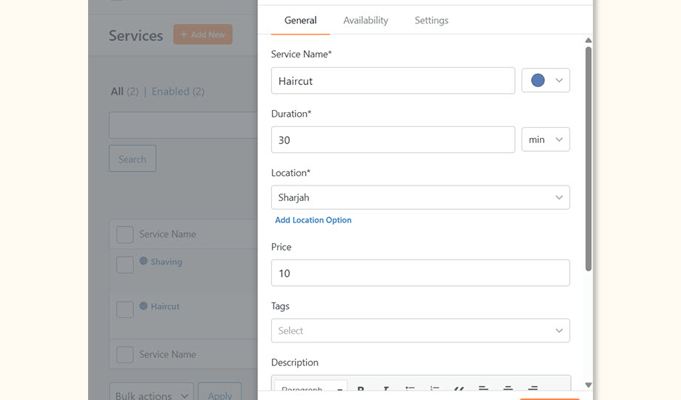
You keep control of your branding and customer data, since the booking flow stays on your site. This also provides a more seamless experience for your visitors.
The plugin includes flexible scheduling rules that allow you to set business hours, buffer times, and specific blackout dates for holidays. This automation ensures you never get double-booked and your schedule remains perfectly organized.
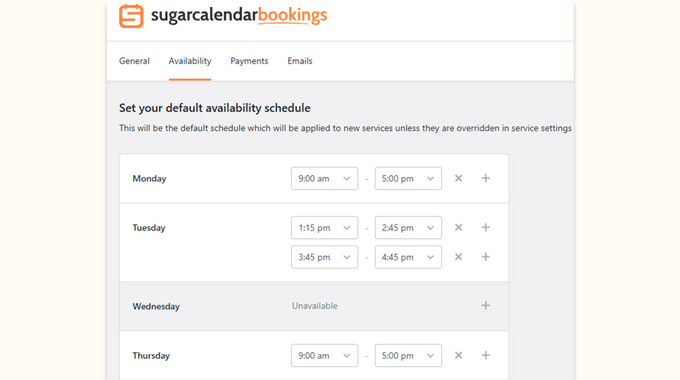
Plus, automated email notifications keep both you and your customers informed about new bookings, cancellations, or changes. This removes the manual stress of managing reminders and ensures everyone stays on the same page.
Additionally, payments are handled seamlessly via Stripe integration, which allows you to collect fees at the time of booking. It helps you get paid faster and more reliably, with no coding required.
For more details, see our Sugar Calendar Bookings announcement post.
AIOSEO Adds AI Keyword Report to Track Brand Rankings in AI Search + Smarter Blocks for Recipes, Products, & Navigation
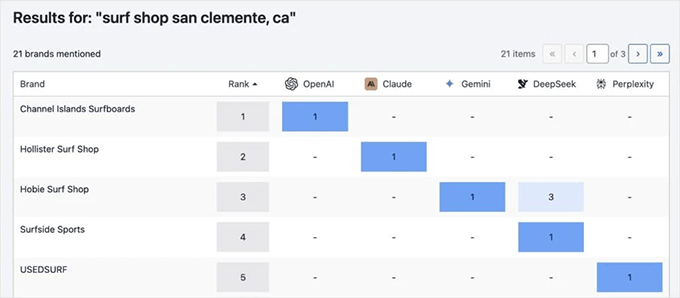
All in One SEO recently released a new AI Keyword Report that shows which brands are appearing in AI-driven search results for specific keywords.
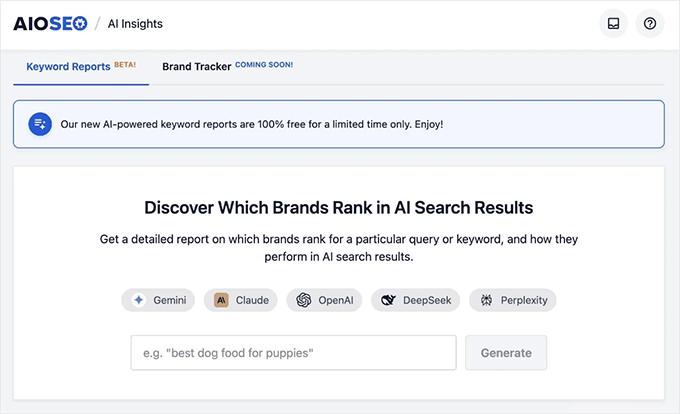
Users can view the answers from different AI platforms directly in their WordPress dashboard.
This data helps website owners identify content gaps and discover new competitors that may not appear in traditional search results.
An upcoming Brand Tracker feature was also announced for the AI Insights section. This will eventually allow site owners to monitor their own brand’s mentions, sentiment, and positioning across major AI platforms over time.
Related: Beginner’s Guide to Generative Engine Optimization for WordPress
AIOSEO also expanded technical SEO tools like redirects to more pricing tiers. Users on the Basic plan can now create redirects and receive automatic notifications to fix broken links when a post URL changes.
AIOSEO also introduced specialized blocks for food bloggers and online sellers. The new Recipe block automatically includes structured data schema markup to help recipes stand out in search results.
Plus, a new Product block allows websites to showcase items without needing a full eCommerce store. It is compatible with popular payment plugins, making it super easy to add a product to your site and start selling.
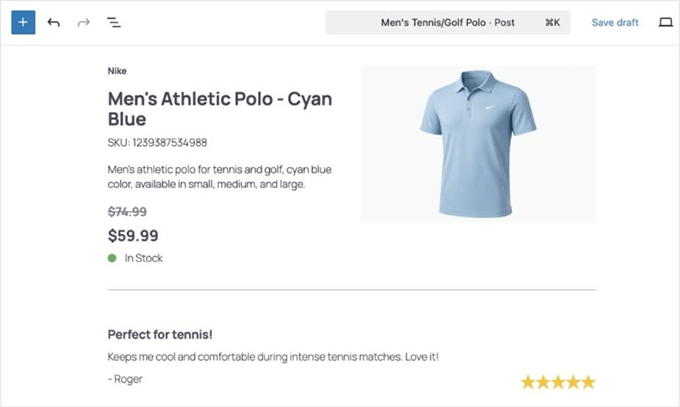
This block also adds rich product schema, which can help display your customer ratings and reviews in search results.
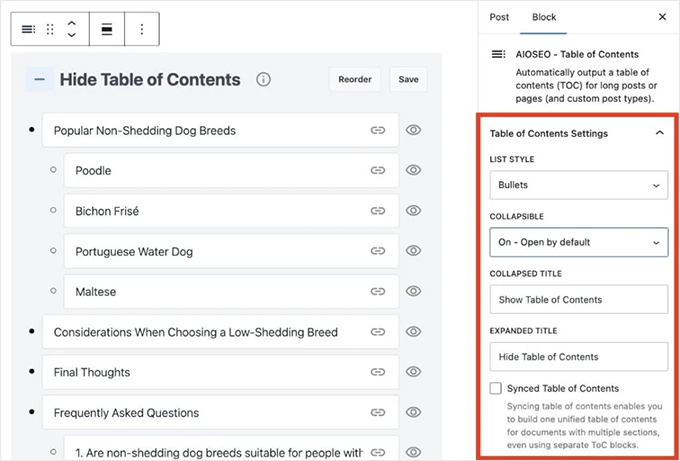
Finally, the Table of Contents block received a significant upgrade, which is now available to all users. You can now add multiple tables per page, use collapsible sections, and reorder headings with drag-and-drop.
WordPress 6.9 Released with AI Abilities API, Block Notes, and Speed Boosts 🎉
WordPress 6.9 was launched live during the State of the Word keynote, with a mix of AI innovation, editor improvements, and performance updates.
A major highlight is the new Abilities API, which creates a machine-readable list of everything your site can do.
This API acts as a shared language that allows AI agents to understand and interact with your plugins and themes securely. You may not notice this change right away, but it lays the groundwork for future AI automation features that can reduce busywork in WordPress.
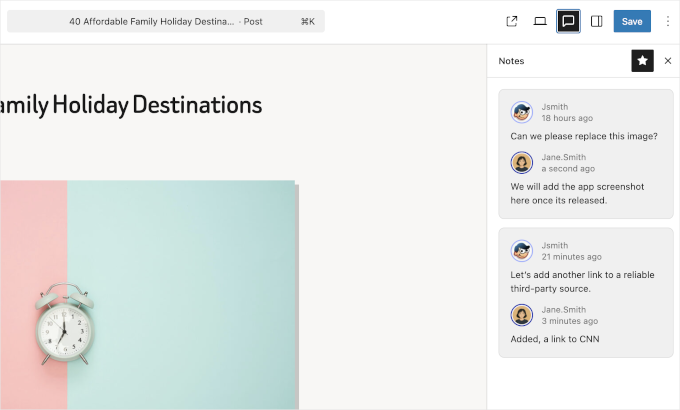
Content creators will also appreciate the new Block Notes feature, which allows teams to leave comments and feedback directly on individual blocks.
This brings a Google Docs-style collaboration experience to the WordPress block editor.
WordPress 6.9 also includes significant speed boosts, such as moving the Emoji detection script to the footer to improve page rendering. It also improves server performance by running scheduled tasks at shutdown rather than during page loads.
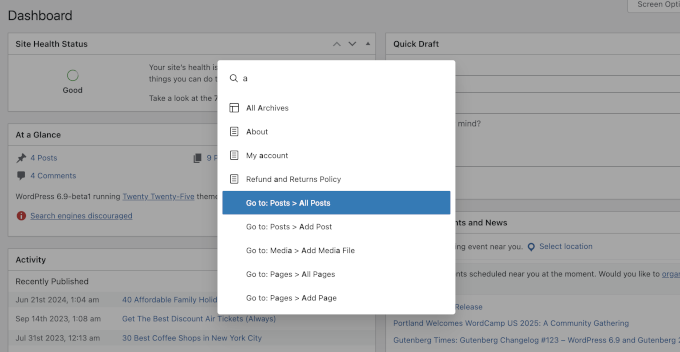
Plus, a new Command Palette is now available across the entire WordPress dashboard, not just the Site Editor. This speeds up navigation by letting you jump to specific admin screens or trigger actions with a few keystrokes.
Designers also gain new tools, such as the Accordion block and the ability to hide specific blocks on the front end. This gives you more flexibility to build interactive templates and test design variations without showing everything publicly.
WPForms Launches Native Notion Addon to Automate Workflows 🪄
WPForms has introduced a native Notion addon that allows users to send form entries directly to their Notion databases. This integration eliminates the need for manual data entry or complicated third-party connectors.
You can easily map your form fields to specific Notion properties, including text, dates, and multi-select tags. For example, you can send new leads to a CRM board, support requests to a tracker, or job applications to a hiring database.
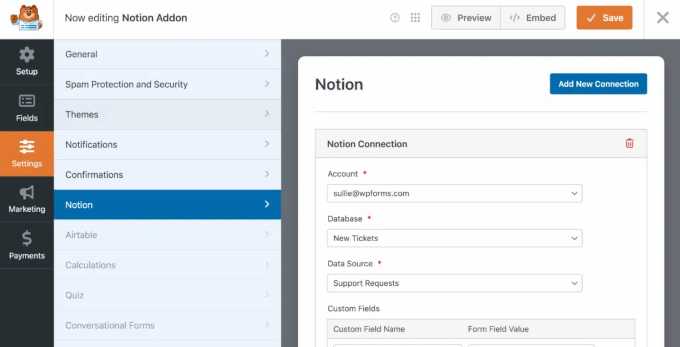
The addon also supports conditional logic, which lets you send data to Notion only when specific criteria are met. This helps keep your database clean, with only the entries you actually need.
State of the Word 2025 Celebrates Innovation and the Future of WordPress 🌐
The annual State of the Word keynote highlighted WordPress’s massive growth, with the platform now powering 43% of all websites globally.
WordPress has achieved a significant 60% market share of the CMS industry, showing its continued popularity for creating websites.
One of the most exciting shifts is the growth outside of the English-speaking community. For the first time, over 56% of WordPress sites are in languages other than English, with Japanese becoming the second-most-used language.
Matt Mullenweg, co-founder of WordPress, emphasized that AI is now foundational to WordPress, with a dedicated AI team formed earlier this year. They have already shipped four major “building blocks” to make WordPress understandable to AI systems and agents.
The Abilities API and WP AI Client are central to this strategy because they allow developers to build AI features without being locked into one provider. This will allow for collaborative editing and advanced workflows in future releases.
Community impact was also a major theme, with over 5,200 volunteers organizing 81 WordCamps across 39 countries this year. These events help bring new people into WordPress and support local communities around the world.
Search & Replace Everything Introduces Smart Search History for Faster Reuse 🔍
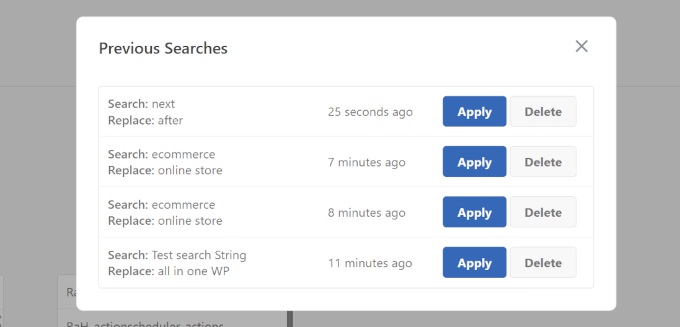
Search & Replace Everything by WPCode now includes a new Smart Search History tool. This feature allows users to quickly access and reuse previous search and replace operations with a single click.
It is incredibly useful for site migrations and frequent content updates where you need to perform the same changes again and again.
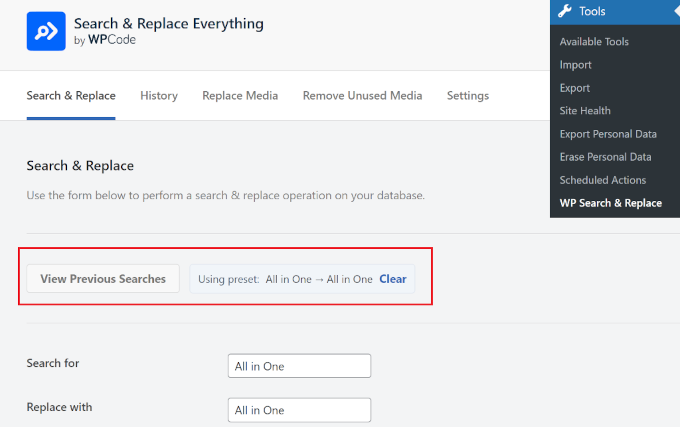
Apart from running previous searches, you can also delete past searches by clicking ‘Delete’.
The plugin remains a top choice for developers due to its full support for serialized data. It also helps prevent replacements from breaking plugin settings or widget data.
WPFilters Launches with “Amazon-Style” Search for WordPress 🛒
The SearchWP team has launched WPFilters, which is a new plugin designed to bring “Amazon-style” faceted search to any WordPress website. It lets visitors narrow down results using categories, tags, and custom data to quickly find exactly what they need.
The plugin is an alternative to complicated filtering tools that often require a developer or are strictly limited to WooCommerce.
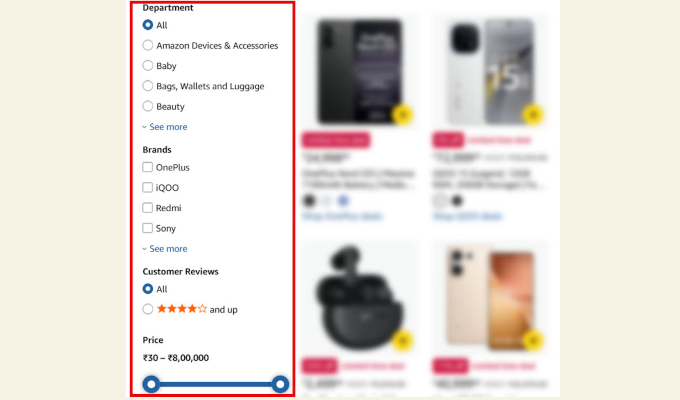
This can improve navigation on blogs, stores, and directories, especially when visitors would otherwise leave because they can’t find the right content.
WPFilters supports a wide range of input types, including checkboxes, radio buttons, and dropdowns. It also features visual range sliders for numeric data such as price or weight, and a one-click reset button to start fresh.
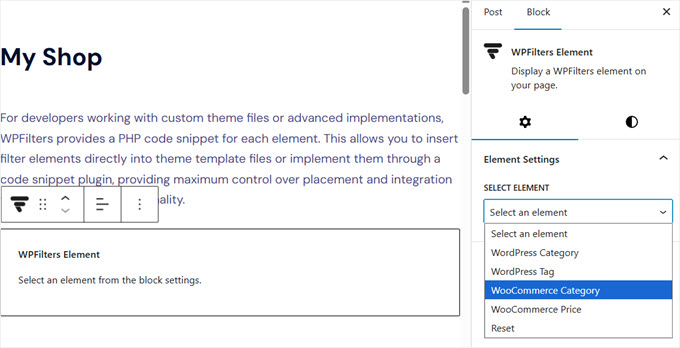
Site owners can filter content by standard categories, authors, tags, or any custom taxonomy. Additionally, the plugin automatically detects data from Advanced Custom Fields and allows you to use those fields as filters.
While it works with the default WordPress search, it is designed as a companion for the SearchWP engine to provide even more control over search.
For more details, see our WPFilters announcement post.
Charitable Launches Visual Donation Form Builder for Drag-and-Drop Fundraising 💖
Charitable has introduced a brand-new Visual Donation Form Builder that makes it easier for nonprofits to create fundraising campaigns. This drag-and-drop tool lets you design donation forms visually inside WordPress.
You can now arrange fields, adjust layouts, and see a real-time preview of exactly what your donors will see. This removes the guesswork and technical hassle of configuring forms through traditional settings pages.
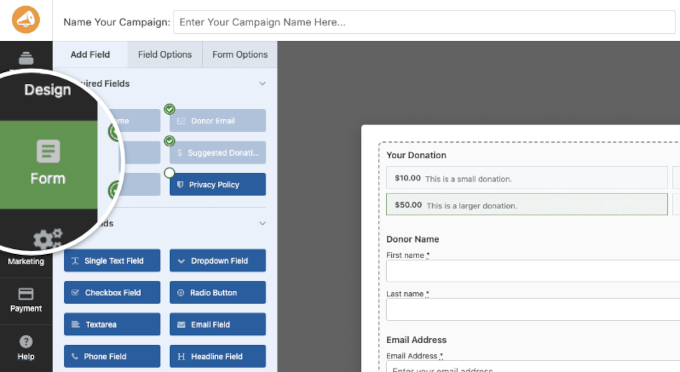
The builder includes a wide variety of fields, from basic contact information to advanced options like custom messages and file uploads.
You also have full creative control over styling, alignment, and even custom CSS for a professional look.
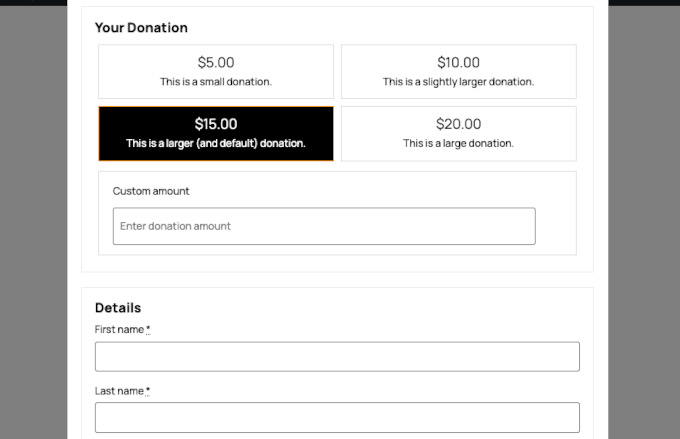
Plus, nonprofits can get their campaigns up and running in minutes by choosing from pre-built templates or starting from scratch.
In Other News 🗞️
BuddyBoss has introduced Competitions. This new gamification feature in the Plus plan adds time-bound challenges and visible progress tracking to your online community to create urgency.
Easy Digital Downloads introduced a new Cart Preview feature—a sleek, slide-out drawer that shows the cart instantly after adding a product. EDD Pro users also get access to AI-powered Cart Recommendations, which can increase sales with personalized suggestions at checkout.
RewardsWP now includes Points, a redesigned rewards widget, and a new dashboard to help you build customer loyalty through purchases, referrals, and redemptions. These features let you easily customize point systems, track results, and manage members with new import tools and reporting features.
Envira Gallery added two new layouts: Grid Fixed Title and Vertical Line Grid. They offer more creative ways to display galleries with side-by-side descriptions and editorial columns.
SeedProd – Build Professional Websites Using AI

SeedProd lets you instantly build professional websites with a single prompt. Simply describe your business details, and it will generate a ready-to-launch website with content in less than 60 seconds.
WooCommerce and Stripe have announced a new Agentic Commerce Suite. It uses AI to automate tasks like personalized customer offers and smarter checkout workflows.
Advanced Custom Fields (ACF) has introduced an inline editing feature that lets users edit custom field data directly in the block editor.
New Plugins & Tools
Sugar Calendar Bookings – A powerful appointment scheduling tool that lets you manage time slots and payments directly from your website.
WPFilters – Adds professional “Amazon-style” search filters to your site using categories, tags, and custom fields.
WPChat – A lightweight and fast chat solution for WordPress sites to help improve customer support and engagement.
RewardsWP – A loyalty and rewards plugin that helps you grow your brand through points, referrals, and customer engagement.
That is a wrap for this month’s WPBeginner Spotlight! We hope you enjoyed catching up on the latest news and updates from across the WordPress ecosystem.
Got a product launch, feature update, or cool project you think we should cover? Send us a message, and we might feature it in our next edition.
We’ll see you again next month with another round of WordPress news. Thanks for reading and being part of the WPBeginner family!
If you liked this article, then please subscribe to our YouTube Channel for WordPress video tutorials. You can also find us on Twitter and Facebook.